
Prompt engineering terms can feel overwhelming when you first start working with AI tools. You read about zero-shot prompting, chain-of-thought reasoning, and context engineering without understanding what they mean. The good news is that most of these concepts are simpler than they sound.
This guide explains essential prompt engineering terms that every AI user should know. Each term comes with a simple explanation and a practical example you can try yourself.
Prompt
A prompt is the text you give to an AI model to get a response. It can be a question, an instruction, or a longer message with context and examples. The prompt is your input, and the AI's response is the output.
Example:
"Write a product description for wireless earbuds that highlights comfort and battery life."Everything you type into ChatGPT, Claude, or Gemini is a prompt. The quality of your prompt directly affects the quality of the response you get back.
Zero-Shot Prompting
Zero-shot prompting means asking the AI to do something without providing any examples. You rely entirely on the model's training to understand and complete the task. This is how most people use AI tools by default.
Example:
Classify this review as positive, negative, or neutral: The food was okay, but the service was slow.The AI has never seen this specific review before, but it understands sentiment analysis from its training. Zero-shot works well for common tasks but struggles with unusual formats or specific requirements.
One-Shot Prompting
One-shot prompting adds a single example to your prompt. This example shows the AI exactly what you want, making the output more predictable. One example is often enough to clarify unclear instructions.
Example:
Classify these reviews as positive, negative, or neutral.

Review: Absolutely loved it, will buy again!
Classification: Positive

Review: The food was okay, but the service was slow.
Classification: Neutral
By showing one example first, the AI understands the exact format you want. It follows the pattern and produces consistent output.
Few-Shot Prompting
Few-shot prompting provides multiple examples, typically three to five. More examples help the AI recognize patterns and handle edge cases better. This technique is useful when consistency matters or when the task is complex.
Example:
Convert these sentences to formal business English.

Casual: Hey, can you send that over?
Formal: Could you please forward that document at your earliest convenience?

Casual: Thanks a bunch!
Formal: Thank you very much for your assistance.

Casual: Let's circle back on this later.
Formal: Let us revisit this matter at a later time.
With multiple examples, the AI learns the tone, structure, and level of formality you expect. Few-shot prompting takes more effort to set up but delivers more reliable results.
Chain-of-Thought Prompting
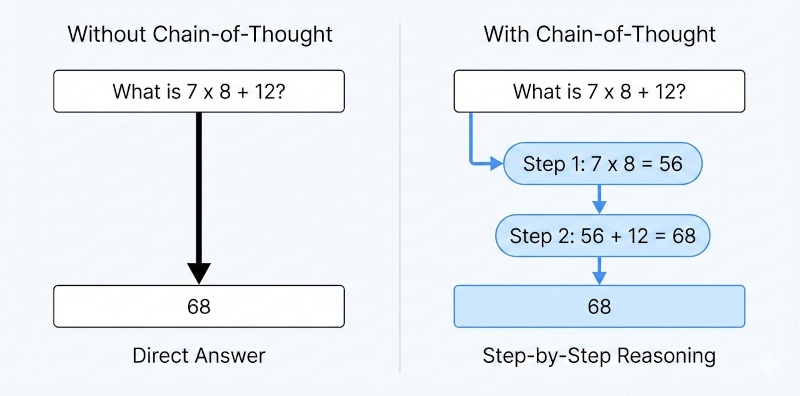
Chain-of-thought prompting encourages the AI to reason through a problem step by step before giving a final answer. Instead of jumping to conclusions, the model shows its work. This technique improves accuracy on math problems, logic puzzles, and complex reasoning tasks.
Example:
"A store sells apples for $2 each. If you buy 5 or more, you get 20% off the total. How much do 7 apples cost? Think through this step by step."The AI will now calculate: 7 apples at $2 each equals $14. Since 7 is more than 5, the 20% discount applies. 20% of $14 is $2.80. The final price is $11.20.
You can trigger chain-of-thought reasoning by adding phrases like "think step by step" or "explain your reasoning" to your prompts.
Tree-of-Thought Prompting
Tree-of-thought prompting extends chain-of-thought by exploring multiple reasoning paths. Instead of following one line of thinking, the AI considers several approaches, evaluates each one, and picks the best path forward. This technique helps with problems that have many possible solutions.
Example:
I need to plan a weekend trip on a $500 budget. Consider at least three different approaches: a road trip, a flight to a nearby city, and staying local with activities. Evaluate the pros and cons of each before recommending one.The AI explores each branch, weighs the tradeoffs, and arrives at a more thoughtful recommendation. Tree-of-thought is overkill for simple questions but shines when you need the AI to consider alternatives before deciding.
System Prompt vs User Prompt
A system prompt sets the overall behavior of the AI for an entire conversation. It defines the personality, rules, and constraints the model should follow. A user prompt is the individual message you send during the conversation.
System Prompt Example:
"You are a friendly customer support agent for a software company. Keep responses under 100 words. Never discuss competitor products."User Prompt Example:
"How do I reset my password?"The system prompt runs in the background and shapes every response. The user prompt is the specific question or task at hand. Most consumer AI tools hide the system prompt, but developers use it to customize AI behavior for specific applications.
Prompt Template
A prompt template is a reusable structure with placeholders for variable information. Instead of writing a new prompt from scratch each time, you fill in the blanks. Templates save time and improve consistency across similar tasks.
Example Template:
"Write a [tone] email to [recipient] about [topic]. Keep it under [word count] words. Include a clear call to action."Filled Template:
"Write a professional email to a potential client about our new pricing plans. Keep it under 150 words. Include a clear call to action."Templates work well for repetitive tasks like writing emails, generating product descriptions, or creating social media posts. You build the template once and reuse it many times.
Hallucination
A hallucination occurs when an AI generates information that sounds plausible but is completely false. The model might invent facts, cite nonexistent sources, or confidently describe things that never happened. Hallucinations are one of the biggest risks when using AI for research or factual content.
Example of a Hallucination:
User: Who wrote the book "The Silent Echo" published in 2019?
AI: The Silent Echo was written by Margaret Chen and published by Harper Collins in 2019. It explores themes of memory and loss.
This book, author, and publisher might not exist at all. The AI generated a believable answer because it was trained to produce coherent text, not to verify facts.
Always double-check important facts from AI responses, especially names, dates, statistics, and citations.
RAG (Retrieval-Augmented Generation)
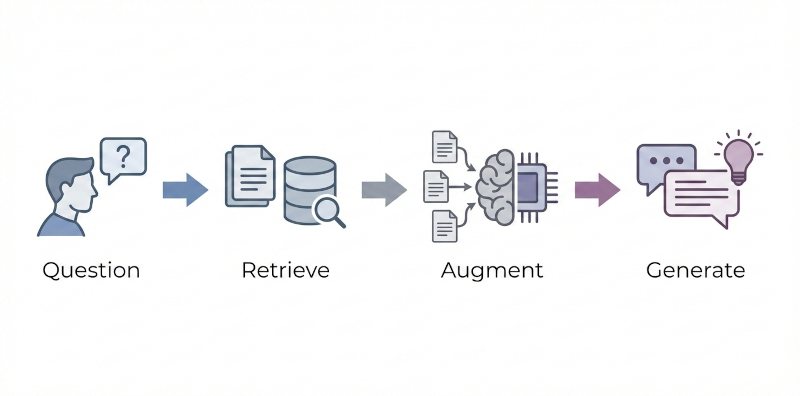
RAG combines an AI model with an external knowledge source. Before generating a response, the system retrieves relevant information from a database, document collection, or search engine. The AI then uses this retrieved context to produce a more accurate answer.
How RAG Works:
- You ask a question.
- The system searches a knowledge base for relevant documents.
- The AI reads those documents and generates an answer based on them.
RAG reduces hallucinations because the AI grounds its response in actual source material. Many enterprise AI tools use RAG to answer questions about company documents, product manuals, or internal knowledge bases.
Prompt Engineering
Prompt engineering is the practice of crafting and refining prompts to get better results from AI models. It involves choosing the right words, structure, and techniques to guide the AI toward the output you want.
This includes everything from writing clear instructions to using techniques like few-shot prompting and chain-of-thought reasoning. Good prompt engineering reduces trial and error and helps you get useful responses on the first try.
Context Engineering
Context engineering is the practice of designing everything the AI sees before it generates a response. This goes beyond writing a single prompt. It includes the system instructions, conversation history, retrieved documents, available tools, and any other information in the context window.
Think of prompt engineering as writing one good question. Context engineering is building the whole environment that helps the AI answer that question well.
Context Engineering Involves:
- Deciding what background information to include.
- Managing conversation history so important details stay visible.
- Choosing which documents or data to retrieve.
- Structuring all this information so the AI can use it effectively.
As AI applications become more complex, context engineering has become just as important as prompt engineering. A well-crafted prompt in a poorly designed context will still produce weak results.
| Term | What It Means |
|---|---|
| Prompt | The text input you give to an AI |
| Zero-shot | Asking AI to perform a task without examples |
| One-shot | Providing one example to guide the AI |
| Few-shot | Providing multiple examples (typically 3-5) |
| Chain-of-thought | Prompting AI to reason step by step |
| Tree-of-thought | Exploring multiple reasoning paths before answering |
| System prompt | Background instructions that shape AI behavior |
| User prompt | Your individual message or question |
| Prompt template | Reusable prompt structure with placeholders |
| Hallucination | AI-generated false information that sounds true |
| RAG | Retrieving external knowledge before generating |
| Prompt engineering | The practice of crafting effective prompts |
| Context engineering | Designing the full information environment for AI |
Start Using These Techniques
Understanding prompt engineering terms is the first step. The next step is to apply them. Start with zero-shot prompting for simple tasks. Add examples when you need more consistency. Use chain-of-thought for complex reasoning. Save your best prompts as templates so you can reuse them.
Building a library of effective prompts takes time, but it pays off. Every prompt you save is a problem you have already solved.
Looking for a place to organize and reuse your best prompts? SpacePrompts lets you save, categorize, and access your prompt library from anywhere.