Prompt Cowboy vs SpacePrompts: Which Prompt Tool Fits You?
An honest, feature-by-feature look at where Prompt Cowboy wins, where SpacePrompts wins, and which one fits the way you work.
By Rico Daniel Catacutan · Last updated: June 2026
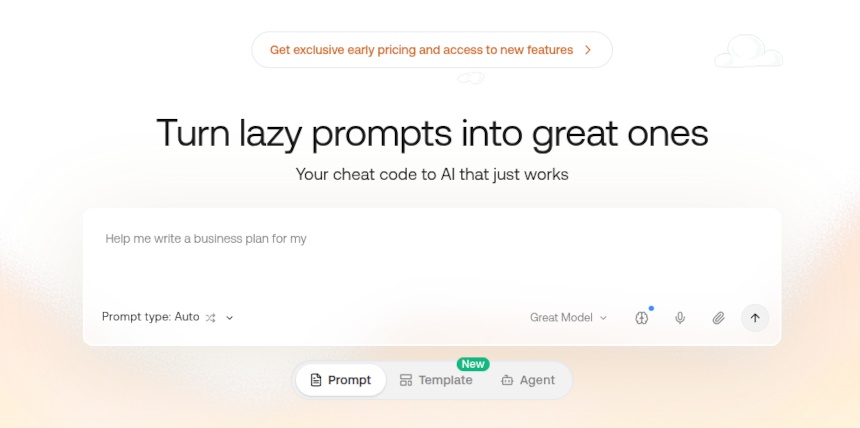
If you're searching for a Prompt Cowboy alternative, the answer depends on what you do after a prompt gets generated. Prompt Cowboy is good at one job: turning a rough idea into a polished prompt. SpacePrompts covers that job too, then handles everything that comes next, like organizing, versioning, testing, and sharing prompts with your team. This comparison breaks down where each tool wins, with current pricing and feature details for both. You can also read our full breakdown of the best prompt management tools in 2026 for a wider view.
What Prompt Cowboy Does Well
Credit where it's due. Prompt Cowboy has a guided builder that turns lazy prompts into structured ones, and it does this fast. The library of ready-to-use prompts is large, so beginners can start from something proven instead of a blank page. You can also attach files to a run, set up “memories” (custom instructions applied to every generation), and roll a prompt back to an earlier version. Teams get a shared library with folders and permissions.
For someone who wants better prompts with zero setup, it works. The friction shows up later, when your prompt collection grows and you need to find, organize, and reuse what you've built.
TL;DR
The Verdict
 Choose Prompt Cowboy if you:
- Want a guided builder that rewrites rough prompts in seconds
- Like starting from a large library of pre-made prompts
- Only need Claude models for generation
- Prefer a single-purpose tool with minimal setup
 Choose SpacePrompts if you:
- Manage a growing prompt collection and need tags plus custom categories
- Want to test prompts against models from OpenAI, Anthropic, Google, and DeepSeek
- Work inside ChatGPT, Claude, or other AI tools and want a browser extension there
- Need API access to pull prompts into your own apps and workflows
- Want generation, organization, versioning, and team sharing in one place
Prompt Cowboy vs SpacePrompts: Feature Comparison
A row-by-row breakdown of pricing, AI models, organization features, browser extensions, and API access.
| Feature | Prompt Cowboy | SpacePrompts |
|---|---|---|
| Core job | Prompt generation + saved prompt library | Prompt management + generation + enhancement |
| Free plan | 10 premium generations/month, then basic model | 3 AI generations/day |
| Paid (individual) | $11/month (founding rate) | $9/month (Pro) |
| Team plan | Yes | Yes |
| AI models | Claude only (3 models) | 11 models across OpenAI, Anthropic, Google, and DeepSeek |
| Prompt tags | No | Yes |
| Custom categories | No | Yes |
| Version control | Yes | Yes |
| Browser extension | No | Chrome, Firefox, and Edge |
| API access | No | REST API |
| Playground / test runs | Claude models only | Yes, 11 models across 4 providers |
| AI prompt evaluation | No | Yes |
| File attachments | Yes | No |
| Custom instructions / memories | Yes (3 free, unlimited paid) | No |
| Ready-made prompts | Large built-in library | Public prompt gallery + templates library |
| JSON import | No | Yes |
| Tokenizer tool | No | Yes |
Why People Look for a Prompt Cowboy Alternative
These are the most common gaps users hit, based on hands-on testing in June 2026.
You can only generate and test with Claude models
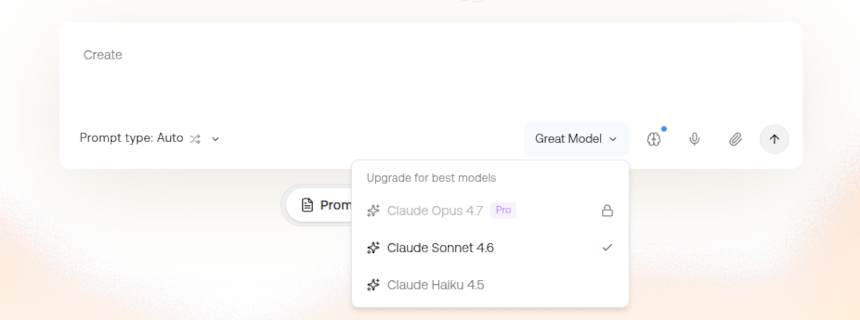
Prompt Cowboy runs on three Claude models: Opus 4.7, Sonnet 4.6, and Haiku 4.5. They're strong models, but prompts behave differently across providers, and a prompt tuned and tested only on Claude might underperform on GPT or Gemini. SpacePrompts lets you run the same prompt against 11 models in the Playground: GPT-5.4, GPT-5.4 mini, and GPT-5.4 nano from OpenAI, the same three Claude models, Gemini 2.5, 3, and 3.1 from Google, plus DeepSeek V3.2 and R1. You see how a prompt performs where you'll actually use it, before it matters.
No tags or custom categories
Once you've saved a few dozen prompts, organization becomes the whole game. Prompt Cowboy offers folders through its Team plan but no tags and no custom categories. SpacePrompts was built around this problem. Tag a prompt “cold-email” and “saas” at the same time, file it under a category you created, and find it in seconds a month later.
No browser extension
Prompt work happens inside ChatGPT, Claude, and similar tools, not in a separate tab. Prompt Cowboy makes you copy and paste between its site and your AI tool every time. The SpacePrompts extension for Chrome, Firefox, and Edge puts your library where you write, which removes that round trip completely.
No API access
If you build products or automate workflows, you need prompts available programmatically. Prompt Cowboy has no API. SpacePrompts has a REST API, so your saved prompts can feed your own apps, scripts, and pipelines instead of living in someone else's UI.
Pricing: $11/month vs $9/month
Both tools are freemium, and the gap starts at the free tier. Prompt Cowboy's free plan includes 10 generations per month with its top Claude model, then switches you to a basic one. The SpacePrompts free plan gives you 3 AI generations every day, around 90 a month, and no card is required to sign up.
On the paid side, Prompt Cowboy's Individual plan costs $11/month and buys unlimited generations with their top model, unlimited memories, and reusable templates. SpacePrompts Pro costs $9/month and covers unlimited prompt storage along with 300 AI enhancements, 300 generations, and 300 Playground runs each month. Beyond the $2 difference, the real gap is scope. One subscription pays for a generator. The other pays for generation, organization, version history, multi-model testing, and the extension together.
Both tools offer a team tier as well. Prompt Cowboy Teams centers on a shared library and team templates. SpacePrompts Teams adds collaborative editing and role-based permissions on top of the shared library, which matters once more than two or three people touch the same prompts.
Who Should Use Which
Prompt Cowboy fits casual AI users who write a handful of prompts per week, want them improved instantly, and don't keep a long-term library. Its free tier covers light use, and the memories feature is genuinely handy if you run the same custom instructions constantly.
SpacePrompts fits people whose prompts are assets: developers shipping prompts to production through the API, teams sharing a versioned library, marketers and writers reusing tested prompts daily, and anyone whose collection outgrew a notes app. If you treat prompts as things you build once and reuse for months, the management layer is the product, and that's what SpacePrompts is.
How to Switch from Prompt Cowboy to SpacePrompts
Get your prompts out of Prompt Cowboy.
There's no direct connection between the two tools, so copy the text of each prompt you want to keep.
Create a SpacePrompts account.
The free plan requires no card, and the daily generation limit is enough to rebuild your library piece by piece before deciding on Pro.
Add prompts one by one or bulk import.
Paste prompts individually, or format your collection as a JSON file and use the JSON import to bring everything over in one upload. Apply tags and categories as you add them. Five minutes of tagging now saves hours of searching later.
Install the browser extension.
Add SpacePrompts to Chrome, Firefox, or Edge so your library follows you into ChatGPT, Claude, Gemini, and other AI tools.
Test in the Playground.
Run your migrated prompts against different models to confirm they still perform.
Frequently Asked Questions
Yes, if your prompts outlive the chat window. SpacePrompts generates prompts like Prompt Cowboy does, then adds the layer Prompt Cowboy stops short of: tags, custom categories, testing across OpenAI, Google, and DeepSeek models alongside Claude, browser extensions, and an API. For quick one-off rewrites with no library to maintain, Prompt Cowboy is still a fine pick.
Two things: file attachments and memories. You can attach a file to a generation run, and the memories feature applies your custom instructions to every run automatically. SpacePrompts doesn't offer either today. If those anchor your workflow, weigh them against the organization and testing features you'd gain.
No. SpacePrompts includes its own AI prompt generator and a prompt enhancer, so generating and improving prompts happens in the same place you store them. There's also a public gallery and templates library when you'd rather start from something proven.
